
HP Enterprise MFP, HP Managed MFP - Copying or Digitally Scanning Highlighted Images (white paper)

4
Alternative Settings
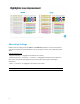
Below you will see settings within the COPY and the SEND TO applications on the control panel that
may alter the appearance of the highlighters if you are not able to use the “Text” mode option listed
above.
Suggested setting to use:
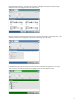
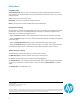
- Background Cleanup = -1 (highlighters will become more visible)
- Background Cleanup = -1, Darkness = +2, Contrast = +2 (highlighters will become more visible, but
other colors will be darker and background may be more visible with a slightly mottled gray
appearance)
- Darker = +2, Contrast = +2 (highlighters may become more visible)
NOTE: Images below show a representative of the menus to make adjustments.