
HP LaserJet Enterprise Flow MFP M830 - User Guide
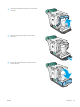

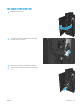

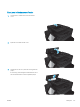


5. Pull the green handle of the stapler unit toward
you and rotate it upward. Push the handle in to lock
it in the open position.
1
2
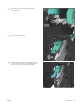
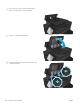
6. Grasp the edges of each staple cartridge and rmly
pull up to remove the staple cartridges from the
staple cartridge unit.
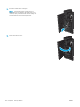
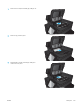
7. Press down on the jam-release at the back of the
saddle-staple cartridge, push up on the plate at the
front of the cartridge, and then remove any
jammed staples.
1
2
3
154 Chapter 9 Solve problems ENWW