
HP LaserJet Enterprise Flow MFP M830 - User Guide



Improve fax image quality
●
Check the scanner glass for dirt and smudges
●
Check the send-fax resolution settings
●
Check the image-adjustment settings
●
Optimize fax quality for text or pictures
●
Check the error-correction settings
●
Send to a dierent fax machine
●
Clean the pickup rollers and separation pad in the document feeder
●
Check the t-to-page setting
●
Check the sender's fax machine
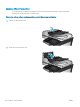
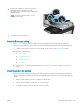
Check the scanner glass for dirt and smudges
Over time, specks of debris might collect on the scanner glass and white plastic backing, which can aect
performance. Use the following procedure to clean the scanner.
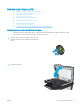
1. Press the power button to turn the product o, and
then disconnect the power cable from the electrical
outlet.
ENWW Improve fax image quality 175