
HP LaserJet Enterprise Flow MFP M830 - User Guide
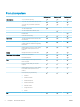

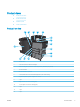

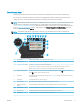

12 Copies eld The Copies eld indicates the number of copies that the product is set to make.
13 Scroll bar Touch the up or down arrows on the scroll bar to see the complete list of available features.
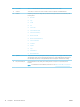
14 Features Depending on the product conguration, the features that appear in this area can include any of the
following items:
●
Quick Sets
●
Copy
●
E-mail
●
Fax
●
Save to USB
●
Save to Network Folder
●
Save to Device Memory
●
Retrieve from USB
●
Retrieve from Device Memory
●
Save to SharePoint®
●
Job Status
●
Supplies
●
Trays
●
Administration
●
Device Maintenance
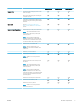
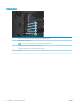
15 Keyboard This product includes a physical keyboard. The keys are mapped to your language in the same way the
virtual keyboard on the product control panel is mapped. If you select a dierent keyboard layout for
the virtual keyboard, the keys on the physical keyboard are remapped to match the new settings.
16 Easy-access USB port Insert a USB ash drive for printing and scanning without a computer or to update the product
rmware.
NOTE: An administrator must enable this port before use. See Print from the USB port on page 56.
10 Chapter 1 Product introduction ENWW