
HP LaserJet Enterprise Flow MFP M830 - User Guide






Make a copy
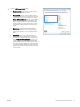
1. Place the document face-down on the scanner
glass, or place it face-up in the document feeder
and adjust the paper guides to t the size of the
document.
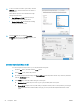
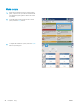
2. From the Home screen on the product control
panel, touch the Copy button.
3. To adjust the number of copies, touch the Copies
eld to open a keypad.
58 Chapter 5 Copy ENWW