
HP LaserJet Enterprise Flow MFP M830 - User Guide



Set up fax
The steps to set up the fax function on the product vary depending on whether you are initially setting up the
product hardware or if the hardware is already set up.
NOTE: The settings congured using the Fax Setup Wizard on the control panel override any settings made in
the HP Embedded Web Server.
●
The rst time the product is turned on with a fax accessory installed
●
After initial product hardware setup
The rst time the product is turned on with a fax accessory installed
The rst time the product is turned on with a fax accessory installed, access the Fax Setup Wizard by following
these steps:
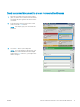
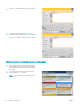
1. From the Home screen on the product control panel, touch Initial Setup.
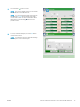
2. Touch the Fax Setup Wizard menu.
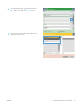
3. Follow the steps in the Fax Setup Wizard to congure the required settings.
4. When the Fax Setup Wizard nishes, the option to hide the Initial Setup button appears on the Home
screen. Fax setup is complete.
NOTE: When rst installed, the fax accessory might read some of these settings from the product;
therefore, a value might already be set. Check the values to verify that they are correct.
After initial product hardware setup
Access the Fax Setup Wizard after initial setup through the control panel by following these steps:
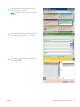
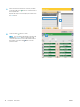
1. From the Home screen on the product control panel, scroll to and touch Administration.
2. Open the following menus:
●
Fax Settings
●
Fax Send Settings
●
Fax Send Setup
●
Fax Setup Wizard
3. Follow the steps in the Fax Setup Wizard to congure the required settings. Fax setup is complete.
NOTE: If the Fax Settings menu does not appear in the menu listing, LAN or internet fax might be enabled.
When LAN or internet fax is enabled, the analog fax accessory is disabled and the Fax Settings menu does not
display. Only one fax feature, either LAN fax, analog fax, or internet fax, can be enabled at a time. If you want to
use analog fax when LAN fax is enabled, use the HP MFP Digital Sending Software Conguration Utility or the HP
Embedded Web Server to disable LAN fax.
80 Chapter 7 Fax ENWW