
HP ElitePad 1000 G2 Rugged Tablet User Guide
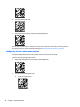
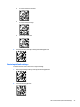
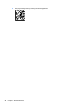
Table Of Contents
- Welcome
- Getting to know your tablet
- Connecting to a network
- Navigating using touch gestures
- Detailed functions
- Power management
- Shutting down the tablet
- Setting power options
- External cards and devices
- Security
- Maintenance
- Backup and recovery (Windows 8)
- Backup and recovery (Windows 10)
- Computer Setup (BIOS), TPM, and HP Sure Start
- HP PC Hardware Diagnostics (UEFI)
- Support
- Specifications
- Accessibility
- Traveling with the tablet
- Electrostatic discharge
- Troubleshooting
- Index

●
To set the volume to medium:
●
To set the volume to high:
●
To turn the volume o:
3. Exit programming mode by scanning the following QR code.
Restoring default settings
To restore the bar-code scanner to its original settings:
1. Open programming mode by scanning the following QR code.
2. Scan the following QR code.
Bar-code scanner (select models only) 27