
HP ElitePad 1000 G2 Rugged Tablet User Guide
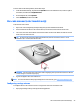
Table Of Contents
- Welcome
- Getting to know your tablet
- Connecting to a network
- Navigating using touch gestures
- Detailed functions
- Power management
- Shutting down the tablet
- Setting power options
- External cards and devices
- Security
- Maintenance
- Backup and recovery (Windows 8)
- Backup and recovery (Windows 10)
- Computer Setup (BIOS), TPM, and HP Sure Start
- HP PC Hardware Diagnostics (UEFI)
- Support
- Specifications
- Accessibility
- Traveling with the tablet
- Electrostatic discharge
- Troubleshooting
- Index

Near Field Communications (NFC)
You can touch an NFC-compatible device to the center front NFC area on the tablet to wirelessly connect and
communicate with the tablet and transfer data back and forth. NFC can also be used for security purposes.
See Front on page 4 to locate the NFC tapping area.
Near Field Communications (NFC) 29