
Operation Manual


2 Getting to know your computer
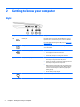
Right
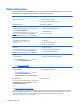
Component Description
(1)
USB 3.0 port Each USB 3.0 port connects an optional USB device, such as a
keyboard, mouse, external drive, printer, scanner or USB hub.
For details about different types of USB ports, see
Using a USB
device on page 41.
(2)
Memory card reader Reads optional memory cards that store, manage, share, or
access information.
(3)
RJ-45 (network) jack/lights Connects a network cable.
●
Green (right): The network is connected.
●
Amber (left): Activity is occurring on the network.
(4) AC adapter/Battery light
●
White: The computer is connected to external power and
the battery is charged from 90 to 99 percent.
●
Amber: The computer is connected to external power and
the battery is charged from 0 to 90 percent.
●
Blinking amber: A battery that is the only available power
source has reached a low battery level. When the battery
reaches a critical battery level, the battery light begins
blinking rapidly.
●
Off: The battery is fully charged.
(5)
Power connector Connects an AC adapter.
4 Chapter 2 Getting to know your computer