
Operation Manual


Top
Top cover
Component Description
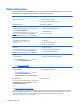
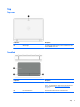
(1) Wireless light On: An integrated wireless device, such as a wireless local area
network (WLAN) device, is on.
TouchPad
Component Description
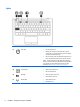
(1) TouchPad zone Moves the pointer and selects or activates items on the screen.
NOTE: The TouchPad also supports edge-swipe gestures. For
more information, see
Edge swipes (select models only)
on page 21.
(2) Left TouchPad button Functions like the left button on an external mouse.
(3) Right TouchPad button Functions like the right button on an external mouse.
Top 7