
Operation Manual

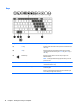

Lights
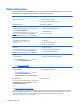
Component Description
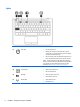
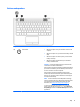
(1)
Power light
●
On: The computer is on.
●
Blinking: The computer is in the Sleep state, a power-
saving state. The computer shuts off power to the display
and other unneeded components.
●
Off: The computer is off or in Hibernation. Hibernation is a
power-saving state that uses the least amount of power.
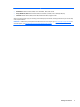
NOTE: For select models, the Intel® Rapid Start Technology
feature is enabled at the factory. Rapid Start Technology allows
your computer to resume quickly from inactivity. For more
information, see
Using power-saving states on page 34.
(2) Caps lock light On: Caps lock is on, which switches the keys to all capital letters.
(3)
TouchPad light
●
Amber: The TouchPad is off.
●
Off: The TouchPad is on.
(4)
Mute light
●
Amber: Computer sound is off.
●
Off: Computer sound is on.
(5)
Wireless light
●
Amber: Wireless is off.
●
Off: Wireless is on.
8 Chapter 2 Getting to know your computer