
Specifications


Table Of Contents
- HP ProLiant ML350 Generation 4 Server Maintenance and Service Guide
- Notice
- Contents
- Illustrated parts catalog
- Removal and replacement procedures
- Required Tools
- Safety considerations
- Preparation procedures
- Removing tower feet
- Removing the front bezel (tower model)
- Rack rails
- Removing the power supply blank
- Hot-plug power supply
- Non-hot-plug power supply
- Hot-Plug Power Supply Backplane
- Removing a hard drive blank
- Hot-Plug SCSI Hard Drive
- Non-hot-plug SCSI hard drive
- Redundant system fan
- Expansion Slot Cover
- Expansion board
- CD-ROM drive
- Tape drive
- Internal two-bay hot-plug SCSI drive cage
- Processor and Heatsink
- PPM
- Second serial port
- Duplex SCSI backplane
- Battery
- System Board
- Re-entering the server serial number and product ID
- Diagnostic tools
- Server component identification
- Specifications
- Acronyms and abbreviations
- Index
Removal and replacement procedures 19
2.
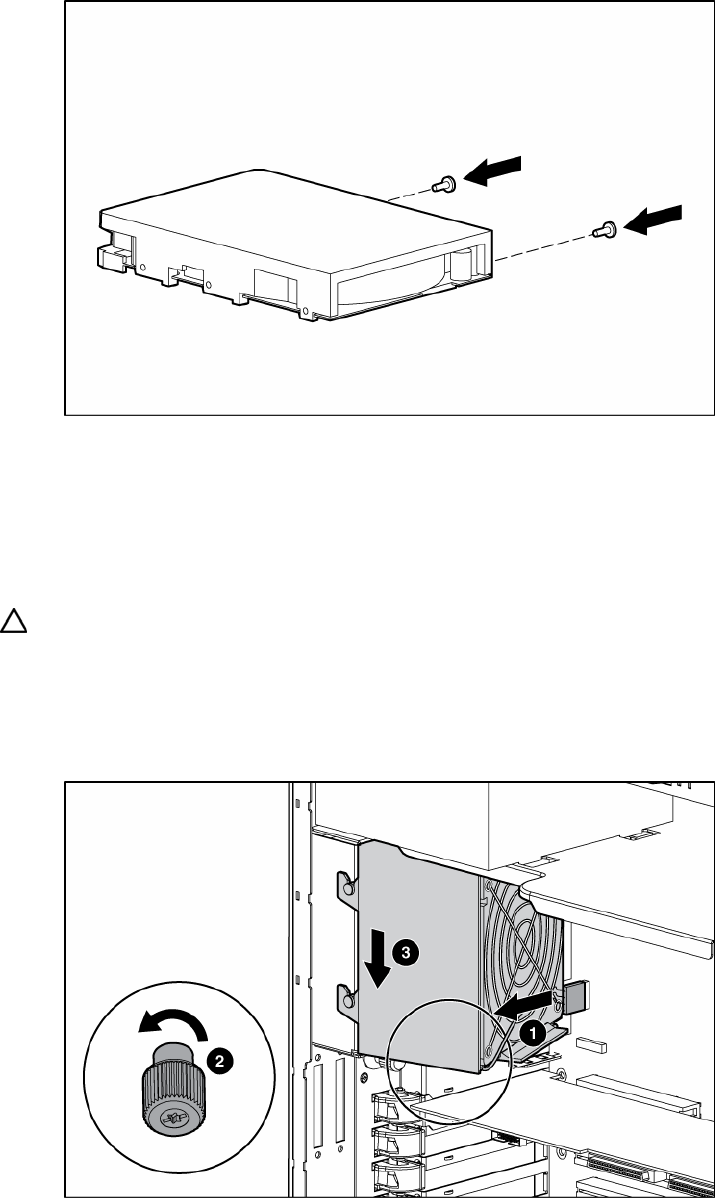
Install two screws on the side of the hard drive to ensure proper alignment inside the bay.
3. Replace the hard drive into the hard drive bay, and reinstall the screws.
4. Reconnect the power cable and the four-device SCSI cable to the hard drive.
5. Replace the access panel ("Access Panel" on page 12).
Redundant system fan
CAUTION: The redundant system fan is not hot-pluggable.
To remove the redundant system fan:
1. Remove the access panel ("Access Panel" on page 12).
2. Remove the redundant system fan cable from the redundant system fan header on the system board.
3. Remove the fan.
To replace the component, reverse the removal procedure.