
Specifications


Table Of Contents
- HP ProLiant ML350 Generation 4 Server Maintenance and Service Guide
- Notice
- Contents
- Illustrated parts catalog
- Removal and replacement procedures
- Required Tools
- Safety considerations
- Preparation procedures
- Removing tower feet
- Removing the front bezel (tower model)
- Rack rails
- Removing the power supply blank
- Hot-plug power supply
- Non-hot-plug power supply
- Hot-Plug Power Supply Backplane
- Removing a hard drive blank
- Hot-Plug SCSI Hard Drive
- Non-hot-plug SCSI hard drive
- Redundant system fan
- Expansion Slot Cover
- Expansion board
- CD-ROM drive
- Tape drive
- Internal two-bay hot-plug SCSI drive cage
- Processor and Heatsink
- PPM
- Second serial port
- Duplex SCSI backplane
- Battery
- System Board
- Re-entering the server serial number and product ID
- Diagnostic tools
- Server component identification
- Specifications
- Acronyms and abbreviations
- Index
Removal and replacement procedures 27
4.
Close the processor retaining brackets.
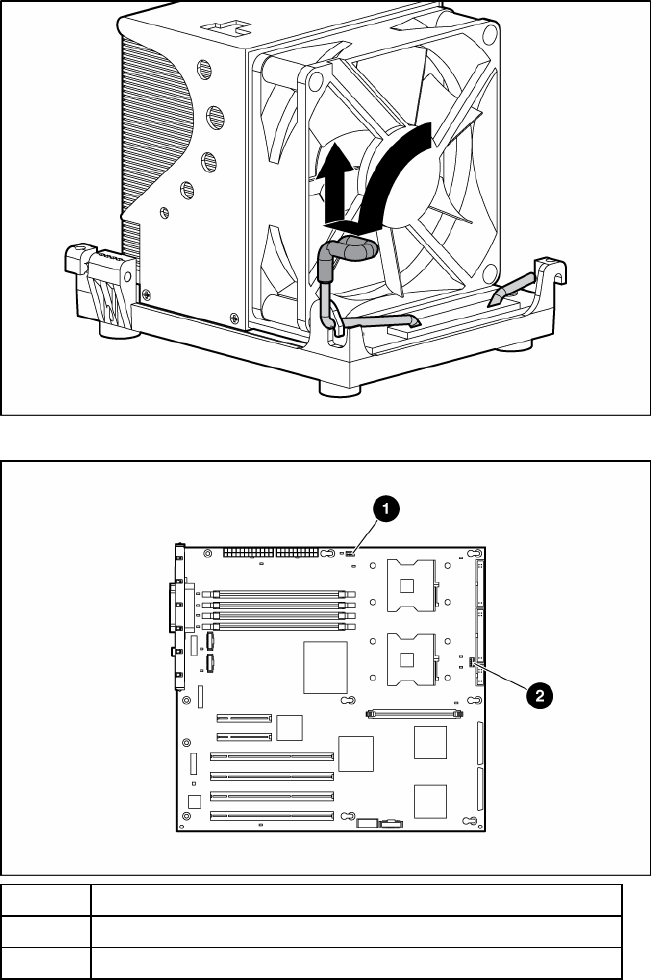
5. Connect the heatsink connector to the correct header on the system board.
Item Description
1 CPU 1 heatsink header
2 CPU 2 heatsink header
6. Replace the access panel ("Access Panel" on page 12).
PPM
To remove the component:
1. Remove the access panel ("Access Panel" on page 12).
2. Open the latches on the PPM slot.
3. Install the PPM for processor 2 (if installing a second processor).