
Specifications


Table Of Contents
- HP ProLiant ML350 Generation 4 Server Maintenance and Service Guide
- Notice
- Contents
- Illustrated parts catalog
- Removal and replacement procedures
- Required Tools
- Safety considerations
- Preparation procedures
- Removing tower feet
- Removing the front bezel (tower model)
- Rack rails
- Removing the power supply blank
- Hot-plug power supply
- Non-hot-plug power supply
- Hot-Plug Power Supply Backplane
- Removing a hard drive blank
- Hot-Plug SCSI Hard Drive
- Non-hot-plug SCSI hard drive
- Redundant system fan
- Expansion Slot Cover
- Expansion board
- CD-ROM drive
- Tape drive
- Internal two-bay hot-plug SCSI drive cage
- Processor and Heatsink
- PPM
- Second serial port
- Duplex SCSI backplane
- Battery
- System Board
- Re-entering the server serial number and product ID
- Diagnostic tools
- Server component identification
- Specifications
- Acronyms and abbreviations
- Index
Removal and replacement procedures 29
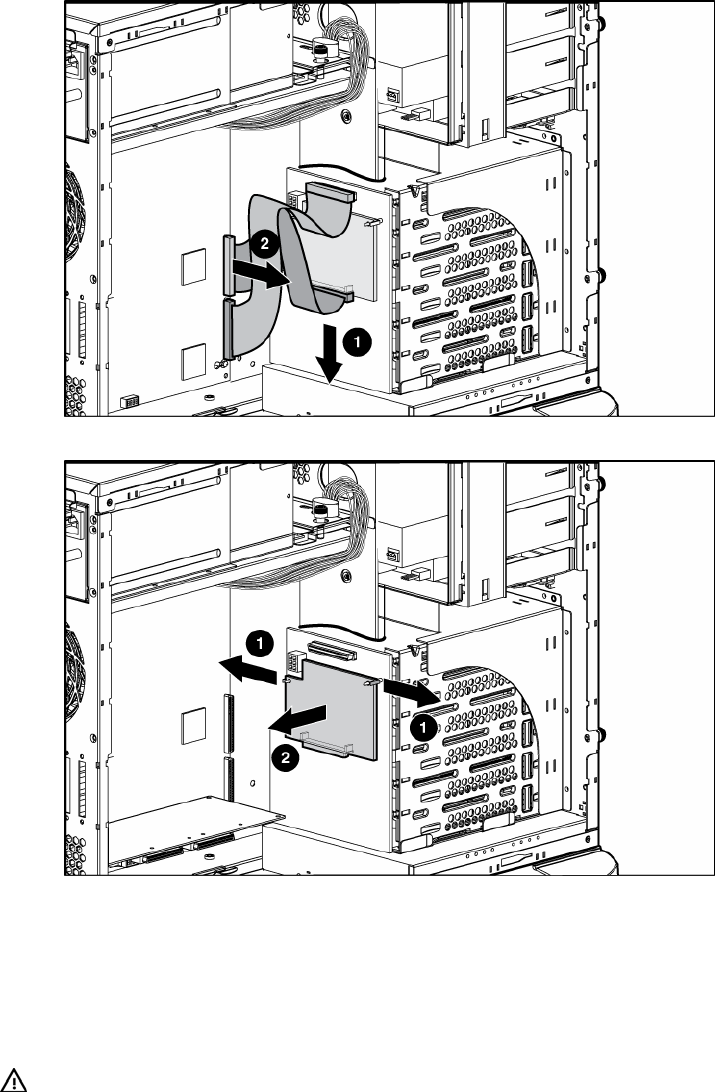
Duplex SCSI backplane
To remove the component:
1. Remove the access panel ("Access Panel" on page 12).
2. Remove the SCSI cable from the duplex SCSI backplane and from either the array controller or the
system board.
3. Remove the duplex SCSI backplane.
To replace the component, reverse the removal procedure.
Battery
If the server no longer automatically displays the correct date and time, you may need to replace the
battery that provides power to the real-time clock. Under normal use, battery life is 5 to 10 years.
WARNING: The computer contains an internal lithium manganese dioxide, a vanadium
pentoxide, or an alkaline battery pack. A risk of fire and burns exists if the battery pack
is not properly handled. To reduce the risk of personal injury: