User guide
Manuals
Brands
HP Manuals
Computers
Proliant ML350 Generation 3
51
52
53
54
55
56
57
58
59
60
Hardware options
installation 53
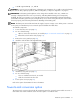
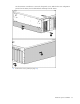
Use the T-10 Torx screwdriver to remove the fron
t panel screws. Unhook
the tower configuration
panels from the chassis, then slid
e th
em back and away from the chassis.
5.
Remove the access panel (on page
18
).
1
...
...
51
52
53
54
55
...
...
106