
HP Designjet 4000 Printer Series - Quick Reference Guide



7
How do I manage print jobs?
● “How do I submit a job?” on page 101
● “How do I save a job?” on page 102
● “How do I print a saved job?” on page 102
● “How do I check ink and paper usage for a job?” on page 102
● “How do I cancel a job?” on page 102
● “How do I manage the print queue?” on page 103
● “How do I nest jobs to save roll paper?” on page 105
How do I submit a job?
1. Access the Embedded Web Server (see “How do I access the Embedded Web
Server?” on page 13).
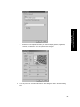
2. Go to the Submit job page.
3. Browse your computer and select the file to print.
Note Submitting a job to be printed via the Embedded Web Server does
not require you to have the printer driver nor the file's native application
installed on your computer.
4. If you want to submit more than one file, click the Add another file button to add
another file.
5. Set the job options.
101
How do I manage print jobs?