
HP Designjet 4000 Printer Series - User Guide





Print content
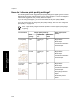
Image quality settings Paper types (front
panel)
Print
quality
Optimized
for
Maximum
detail
Lines and
images
Best Drawings/
text
On Coated Paper
Heavyweight Coated
Paper
Productivity Photo
Gloss
In-store
advertising
Normal Images Off Coated Paper
Heavyweight Coated
Paper
Productivity Photo
Gloss
Renderings Best Images Off Heavyweight Coated
Paper
Productivity Photo
Gloss
Photographs Best Images Off Productivity Photo
Gloss
* Translucent materials include Vellum, Translucent Bond, Natural Tracing Paper,
Clear Film, and Matte Film.
For technical details of print resolution, see “Tell me about functional
specifications” on page 239.
131
How do I adjust my printed
images?