
HP Color LaserJet CP6015 Series - (multiple language) Getting Started Guide




16
15
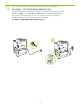
14
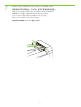
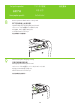
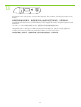
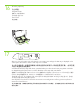
Load the paper.
One at a time, open each paper tray and adjust the paper guides.
装入纸张。
每次打开一个纸盘,调整各纸盘的纸张导板。
Muat kertas.
Satu per satu, buka setiap baki kertas dan sesuaikan pemandu kertasnya.
用紙をセットします。
用紙トレイを一度に 1 つずつ開けて、用紙ガイドを調節します。
용지를 넣습니다.
용지함을 한번에 하나씩 열어 용지 조정대를 조정합니다.
ใส
่
กระดาษ
เปิดถาดกระดาษและปรับตัวกั้นกระดาษทีละถาด
裝入紙張。
逐一打開每個紙匣,然後調整紙張導板。