
HP Color LaserJet CP6015 Series - (multiple language) Getting Started Guide







20
20
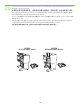
Q6999A
HP Booklet maker/nisher
Q6998A
HP 3-bin stapler/stacker
If you have an optional output accessory to install, use the instructions in the Installation Guide that comes
attached to the accessory box.
如果要安装可选输出附件,请按照附件箱中随附的《安装指南》中的说明进行操作。
Jika Anda punya aksesori keluaran opsional untuk dipasang, gunakan petunjuk dalam Installation Guide
[Panduan Instalasi] yang dipasang pada kotak aksesori.
オプションの排紙アクセサリを取り付ける場合は、アクセサリの箱に付属している『インストール ガイド』の手
順に従ってください。
선택사양 출력 부속품을 사용하려면 부속품 상자와 함께 제공되는 설치 설명서의 지침을 따르십시오.
หากคุณมีอุปกรณ
์
เสริมกระดาษออกที่จะติดตั้งให้ใช
้
คำแนะนำในคู
่
มือการติดตั้งที่ติดมากับกล
่
องอุปกรณ
์
เสริม
如果要安裝選購的輸出附件,請按附件包裝盒隨附的安裝指南中的說明進行。