
HP Color LaserJet CP6015 Series - (multiple language) Getting Started Guide

6
4
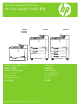
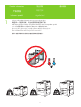
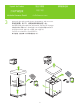
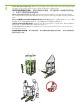
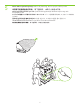
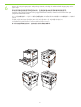
Printers with optional input trays: Remove the packaging and the ramps. Remove the plastic bag and install
the ramps onto the pallet.
Use two people to gently roll the device off of the pallet.
装有可选进纸盘的打印机: 取出包装材料和坡道。 取下塑料袋,将坡道安装在货盘
上。 由两个人轻轻将设备滚离货盘。
Printer dengan baki masukan opsional: Lepaskan kemasan dan landasan. Lepaskan kantung plastiknya
dan pasang landasan pada palet. Gunakan dua orang untuk mendorong perangkat dengan perlahan dari
palet.
オプションの給紙トレイがあらかじめ取り付けられたプリンタ: 梱包材とスロープを取り外します。 ビニール袋を
取り除き、スロープを荷台に取り付けます。 2 人で本体をゆっくりと荷台から降ろします。
선택사양 입력 용지함 포함 프린터: 포장을 벗기고 램프를 분리합니다. 비닐을 벗기고 램프를 팔레트에
설치합니다. 두 사람이 팔레트에서 장치를 밀어 옮깁니다.
เครื่องพิมพ
์
ที่มีถาดป้อนกระดาษเสริม: นำบรรจุภัณฑ
์
และรางออกนำถุงพลาสติกออกและติดตั้งรางบนแท
่
นวางใช
้
แรงคนสองแรงค
่
อยๆ
เลื่อนเครื่องพิมพ
์
มาตามแท
่
นวาง
配備選購進紙匣的印表機: 取下包裝與斜板。取下塑膠袋並將斜板安裝在平板架上。兩個人輕輕地將裝
置從平板架上滑下來。