
HP Embedded Digital Sending - PC Fax Send User Manual

6 Chapter 1 Setting up ENWW
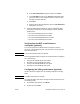
3 Scroll to and touch FAX SEND.
4 Scroll to and touch BILLING CODE.
5 Touch CUSTOM to open the billing code screen.
6 Use the up and down arrows to select the minimum number of
digits in the billing code.
7 Touch OK to enable the billing code feature.
Note Touch OFF to disable the billing code feature.
Installing the driver
To install the MFP Send Fax driver by using the Add a Printer wizard
in Windows, use the following steps:
1 In Windows Explorer, double-click on the downloaded MFP Send
Fax driver executable file to extract the driver files.
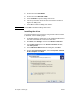
2 Click Start, click Settings, and then click Printers and Faxes.
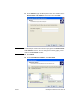
3 In the Printer Tasks pane in the Printers and Faxes window,
click Add a printer.
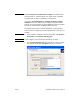
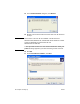
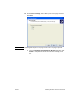
4 In the Add Printer Wizard welcome dialog box, click Next.
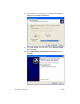
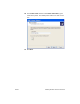
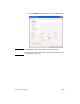
5 Under Local or Network Printer, select Local printer attached
to this computer. Click Next.