
HP Embedded Digital Sending - PC Fax Send User Manual

18 Chapter 2 Faxing ENWW
Sending a fax to a single recipient
To send a fax to a single recipient, use the following steps:
1 Open the document to be faxed in the software program in which
it was created.
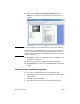
2 Click File and then click Print.
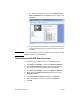
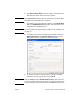
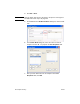
3 Select the HP MFP Send Fax driver from the list of printers.
4 Click OK or Print.
Note Click the button that sends a document to the printer. This might not
be labeled the same way in all programs.
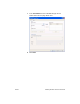
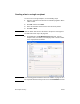
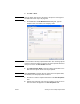
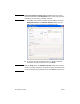
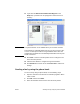
5 Under Fax To in the HP MFP Send Fax dialog box, type the
recipient name, fax number, and company name. The fax number
is the only required information.
Note See “Inserting special characters in the fax number” on page 27 for a
list of special characters that you can use in the Fax Number text field.