
HP Embedded Digital Sending - PC Fax Send User Manual

ENWW Sending a fax to multiple recipients 21
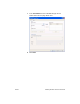
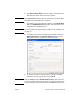
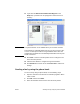
4 Click OK or Print.
Note Click the button that sends a document to the printer. This might not
be labeled the same way in all programs.
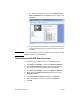
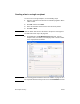
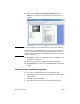
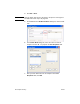
5 Under Fax To in the HP MFP Send Fax dialog box, type the
recipient name, fax number, and company name.
Note The fax number is the only required information. See “Inserting special
characters in the fax number” on page 27 for a list of special characters
that you can use in the Fax Number text field.
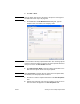
6 Click Add to Phone Book to add the recipient information to the
MFP Send Fax phone book. This step is optional.
Note Click Clear Fields to remove all of the values in the Recipient Name,
Fax Number, and Company Name text boxes.
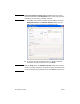
7 Click To -> to add the recipient information to the Fax Recipients
field.
8 Repeat steps 5 through 7 for each fax recipient. The fax is sent to
all of the names that appear in the Fax Recipients field.