
HP Embedded Digital Sending - PC Fax Send User Manual

22 Chapter 2 Faxing ENWW
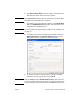
Note Cover Page (Single recipient only) is disabled when the second
recipient is added to the Fax Recipients field. A cover page cannot be
used when you send faxes to multiple recipients.
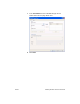
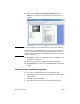
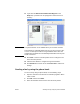
9 If the billing code feature is enabled, type the billing code under
Billing Information in the HP MFP Send Fax dialog box. The
billing code can be changed for any individual fax job.
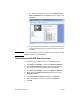
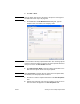
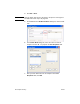
10 To send the fax with the default sender, fax quality, notification
information, and preview preferences, click Send.
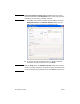
Note Click the Setup tab on the HP MFP Send Fax dialog box to view the
sender, fax quality, notification, and preview settings. This information
can be changed for any individual fax job. Click Send to send the fax.