
HP Embedded Digital Sending - PC Fax Send User Manual

24 Chapter 2 Faxing ENWW
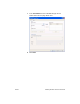
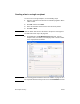
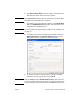
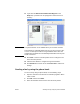
4 Click OK or Print.
Note Click the button that sends a document to the printer. This might not
be labeled the same way in all programs.
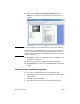
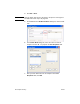
5 Under Fax To in the HP MFP Send Fax dialog box, click the book
icon.
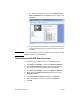
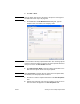
6 In the Phone Book dialog box, select the name of each fax
recipient and click To -> to populate the Fax Recipients field.
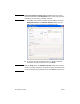
7 After you have added all of the fax recipients to the Fax
Recipients field, click OK.