
HP Embedded Digital Sending - PC Fax Send User Manual

26 Chapter 2 Faxing ENWW
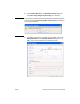
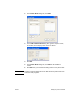
10 To send the fax to all of the fax recipients with the default sender,
fax quality, notification information, and preview preferences, click
Send.
Note Click the Setup tab on the HP MFP Send Fax dialog box to view the
sender, fax quality, notification, and preview settings. This information
can be changed for any individual fax job. Click Send to send the fax.
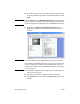
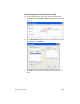
11 If you selected Show Preview Before Sending Fax on the
Setup tab, a preview of the fax job appears. Review the fax for
accuracy.
Note The preview function is not available when you use Point and Print.
Point and Print is a Windows feature that you can use to connect, print,
or fax to a remote printer without using installation disks. Files and
configuration information are automatically downloaded from the print
server to the client.
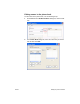
12 Click View or use the zoom drop-down menu to change the size
of the document preview.
13 Click the arrow buttons to navigate through the document.
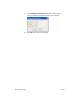
14 Click Send Fax to send the fax or click Cancel Fax to edit the fax
settings.