
HP Embedded Digital Sending - PC Fax Send User Manual

ENWW Setting the fax quality 35
Note The information in the sender information fields on the Setup tab is
updated the first time that the sender information is entered in the
sender information fields in the Default Settings dialog box. If the
default sender information is changed later, the sender information
fields on the Setup tab are not refreshed. The changes are saved, but
the information does not appear in the dialog box. To show the new
information, exit from the MFP Send Fax driver and then restart the
driver.
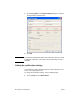
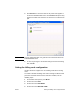
3 Click OK.
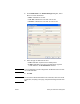
Note To set all of the default information at the same time, select the fax
quality, notification, cover page, and preview settings and then click OK.
Setting the fax quality
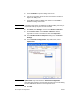
The fax quality setting defines the resolution that the MFP uses to
send the fax. The quality settings are as follows:
● Standard: 200 x 100 dots per inch (dpi)
● Fine: 200 x 200 dpi
● Superfine: 300 x 300 dpi
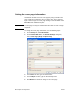
To set the fax quality, use the following steps:
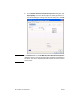
1 On the Setup tab, click Edit Defaults.