
HP Embedded Digital Sending - PC Fax Send User Manual

36 Chapter 3 Configuration ENWW
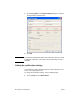
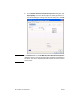
2 Under Fax Quality in the Default Settings dialog box, select the
default quality for sending faxes.
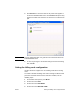
3 Click OK.
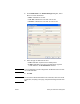
Note To set all of the default information at the same time, select the sender
information, notification, cover page, and preview settings and then
click OK.
Setting the notification settings
The notification settings determine when and how notification of the
status of an outgoing fax is sent.
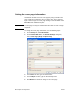
To change the notification settings, use the following steps:
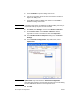
1 On the Setup tab, click Edit Defaults.