
HP Embedded Digital Sending - PC Fax Send User Manual

38 Chapter 3 Configuration ENWW
Setting the cover page information
Standardize the look of the fax cover page by using a default cover
page. Fields are included for notes, a subject line, and a company
logo or other image. The cover page settings can be modified on the
Fax Job tab for individual fax jobs.
Note A cover page can only be included with faxes that are sent to single
recipients.
To change the cover page information, use the following steps:
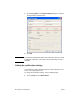
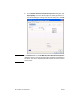
1 On the Setup tab, click Edit Defaults.
2 Under Include With Fax in the Default Settings dialog box,
select Cover Page (Single recipient only).
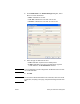
3 In the Notes text box, type the default notes.
4 In the Subject text box, type the default subject line.
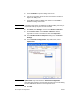
5 Click Browse to include an image on the cover page.