
HP Embedded Digital Sending - PC Fax Send User Manual

40 Chapter 3 Configuration ENWW
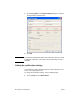
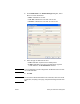
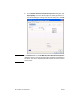
3 In the HP MFP Send Fax Document Properties dialog box, click
Paper/Quality to set the default paper and quality properties. To
save the default paper settings and close the dialog box, click OK.
Note The Advanced tab on the HP MFP Send Fax Document Properties
dialog box does not contain any information that affects the MFP Send
Fax driver. This tab is a standard Windows tab and cannot be removed
for this driver.