
HP Embedded Digital Sending - PC Fax Send User Manual

42 Chapter 3 Configuration ENWW
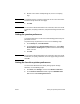
5 Touch CUSTOM to open the billing code screen.
6 Use the up and down arrows to select the minimum number of
digits in the billing code.
7 Touch OK to enable the billing code feature or touch OFF to
disable the billing code feature.
Note If the billing code feature is enabled on the MFP, a billing code entry is
required for walk-up fax jobs sent from the MFP.
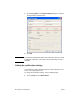
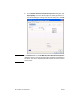
8 Click Start, click Settings, and then click Printers and Faxes.
9 Under Printer Tasks on the Printers and Faxes window,
right-click the name of the MFP and then click Properties.
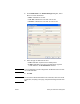
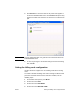
10 In the HP MFP Send Fax Properties dialog box, click Device
Settings.
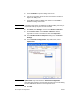
11 In the Automatic Configuration: drop-down menu, select
Update Now.
Note Update Now stays selected in the Automatic Configuration
drop-down menu briefly. If you wait a few seconds or return to this dialog
box later, Off will be selected in the drop-down menu.
12 Click OK.