
HP Embedded Digital Sending - PC Fax Send User Manual


ENWW Functional errors 45
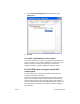
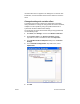
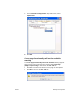
4 In the Automatic Configuration drop-down menu, select
Update Now.
5 Click OK.
An e-mail confirmation is not received
No e-mail confirmation is sent if the receiving fax machine does not
answer, is busy, or if the number of redials that is configured on the
MFP has not been reached. After the MFP has reached the
configured number of redials, confirmation notification is sent.
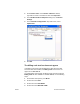
PC FAX SEND does not appear on the MFP
control panel
PC FAX SEND does not appear on the MFP control panel after
installing the MFP Send Fax driver.
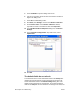
Firmware is packaged in bundles called remote firmware updates
(RFU). These bundles contain firmware updates for the MFP and
different sub-systems located in the MFP. When the RFU bundle is
sent to the MFP, the MFP sends the individual firmware updates to its
other sub-systems. Sometimes, not all of these updates happen at
the same time.