
HP Embedded Digital Sending - PC Fax Send User Manual


ENWW Functional errors 47
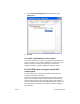
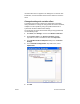
2 Under Printer Tasks on the Printers and Faxes window,
right-click the name of the MFP and then click Properties.
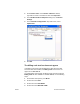
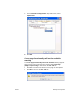
3 In the HP MFP Send Fax Properties dialog box, click Device
Settings.
4 In the Automatic Configuration: drop-down menu, select
Update Now.
5 Click OK.
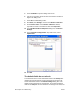
The billing code text box does not appear
If the billing code feature was disabled at the MFP when the MFP
Send Fax driver was installed, the Billing Code text box does not
appear on the Fax Job tab.
To enable billing codes through the MFP control panel and make the
Billing Code text box available on the Fax Job tab, use the following
steps:
1 On the MFP control panel, press Menu.
2 Scroll to and touch FAX.
3 Scroll to and touch FAX SEND.
4 Scroll to and touch BILLING CODE.