
HP Embedded Digital Sending - PC Fax Send User Manual


50 Chapter 4 Troubleshooting ENWW
Changed settings do not take effect in a Point and
Print installation
If you are using a Point and Print installation, the notification, billing
code, billing-code length, and fax-enabled features cannot be
refreshed by using the Update Now feature. To make these setting
changes take effect in a Point and Print installation, delete the Send
Fax printer and then reinstall the printer.
Note The fax preview function is not available when you use Point and Print.
Warning messages
The following warning messages might appear when you use the HP
MFP Send Fax driver.
PC fax feature may be disabled at the MFP
warning
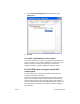
The PC fax feature may be disabled at the MFP warning appears if
the driver port has been changed.
To update the configuration settings, use the following steps:
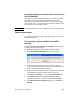
1 In the MFP Send Fax Warning message box, click OK.
2 Verify that the MFP firmware has been updated to the most
current version available. See “Determining if the MFP Send Fax
driver is supported by the MFP” on page 3.
3 Verify that the PC FAX SEND feature is enabled on the MFP. See
“Uninstalling the HP MFP Send Fax driver” on page 16.
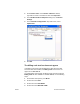
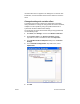
4 Click Start, click Settings, and then click Printers and Faxes.
5 Under Printer Tasks on the Printers and Faxes window,
right-click on the name of the MFP and then click Properties.
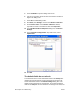
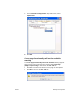
6 In the HP MFP Send Fax Properties dialog box, click Device
Settings.