
HP Embedded Digital Sending - PC Fax Send User Manual


52 Chapter 4 Troubleshooting ENWW
Error messages
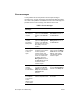
If a fax problem occurs that prevents or interrupts sending or
receiving a fax, an error message is generated that helps determine
the cause of the problem. See table 2 for a list of error messages, the
possible causes of the message, and solutions to the error.
Table 2: Error messages
Error
Message
Cause Solution
At least one
fax number is
required
A fax number was not
typed in the Fax Number
text box on the Fax Job
tab
.
Type a fax number in the
Fax Number text box on
the Fax Job tab.
Missing
required
information:
Billing Code
A billing code was not
typed in the Billing Code
text box on the Fax Job
tab. This error only occurs
when billing codes are
enabled.
Type a billing code in the
Billing Code text box on
the Fax Job tab.
The billing
code must be
at least “n”
digits
The billing code was
configured on the MFP to
contain a specified
number of digits. This
error occurs when billing
codes are enabled and
the billing code in the
Billing Code text box on
the Fax Job tab does not
contain the correct
number of digits.
Check the billing code
that is typed in the Billing
Code text box on the Fax
Job tab. Type a billing
code with the specified
number of digits.
Missing
required
information:
E-mail address
An e-mail address was
not typed in the E-mail
address text box on the
Setup tab when E-mail
notification was
selected.
Type an e-mail address in
the in the E-mail address
text box on the Setup tab.
Warning: This
is a duplicate
entry. Please
enter a
different name
or fax number.
A duplicate entry was
added to the phone book.
Type a different name or
fax number.