
HP LaserJet MFP - Configuring Embedded LDAP Authentication

configure - 13
Step 5: Use the MFP control panel
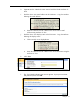
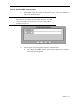
a. At the MFP, touch any option on the main screen. The screen displays a
request for authentication.
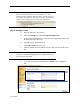
Hint
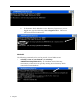
Remember the username is defined within the device user DN
value in the LDP trace and is often your entire email address,
including the @xx.xx.
b. Use the touch screen keypad to input the authentication.
w Once input, click OK, and the chosen option appears; for example,
the Folder screen appears.