
HP LaserJet M3027, M3035, M5025 and M5035 MFP Series - Output Becomes Lighter when the Copy Darkness Range is set to 8

Page 2 of 3
Solution or Workaround:
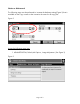
The following steps must be performed to increase the darkness setting (Figure 2) that is
available on the Copy screen so that it remains the same for all copy jobs:
Figure 2
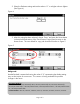
Access the following menu item:
1. ADMINSTRATION, Default Job Options, Image Adjustment (See Figure 3)
Figure 3