
HP LaserJet M3027, M3035, M5025 and M5035 MFP Series - Output Becomes Lighter when the Copy Darkness Range is set to 8

Page 3 of 3
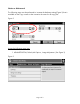
2. Select the Darkness setting and set the value to “0” or a higher value to lighten.
(See Figure 4)
Figure 4
3. After this setting has been selected, choose “Save” and press the Home button
in the top left hand section of the Touch Screen Control panel to return to the
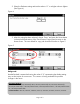
Home screen. The new default for copy jobs should look similar to Figure 5.
Figure 5
Background:
Hewlett-Packard is aware that having the value of “0” representing the darkest setting
may not be intuitive for some users. This concern is being evaluated for possible
changes in the future.
Document Attributes
Product Models: HP LaserJet M3035mfp Base, HP LaserJet M3035mfp XS, HP LaserJet M3027mfp,
HP LaserJet M3027mfp X, HP LaserJet M5035 MFP, HP LaserJet M5035 MFP X, HP LaserJet M5035 MFP
XS, HP LaserJet M5025 MFP
Product Numbers: CB414A, CB415A, CB416A, CB417A, Q7829A, Q7830A, Q7831A, Q7840A