
HP LaserJet M5025/M5035 MFP - (mulitple language) Getting Started Guide


3
English
English
Français
Français
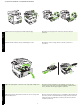
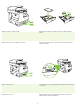
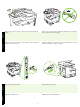
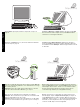
3) Remove all of the orange tape and cardboard packaging. 4) Remove the orange tray locks from tray 2 (callout 1) and tray 3
(callout 2).
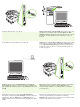
5) Open the upper-right door and remove the orange print-cartridge locks. 6) Remove the print cartridge from its packaging, remove the strip
(callout 1) and orange tape, insert the print cartridge (callout 2) into the
device, and then close the upper-right door (callout 3).
3) Retirez la bande adhésive orange et l’emballage en carton. 4) Retirez les verrous oranges du bac 2 (schéma 1) et du bac 3
(schéma 2).
5) Ouvrez le panneau supérieur droit et retirez les verrous oranges de la
cartouche d’impression.
6) Sortez la cartouche d’impression de son emballage, retirez la bande de
protection (schéma 1) et la bande adhésive orange, insérez la cartouche
d’impression dans le périphérique (schéma 2) puis fermez le panneau
avant droit (schéma 3).
• Prepare the hardware • Préparation du matériel