
Technical data






Using Console and Service Processor Interfaces
Network Configuration for a Service Processor
HP System Partitions Guide: Administration for nPartitions, rev 5.1
149
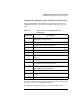
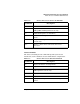
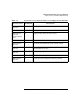
From a PC command prompt: route add 192.168.1.1
ClientName
On an HP-UX workstation login as root and use this command:
/usr/sbin/route add 192.168.1.1
ClientName
After you reconfigure the service processor’s networking, you can remove
these network routing table changes with the route delete... command.
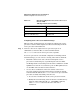
3. Enter this command to confirm the new network connection to
the service processor: ping 198.168.1.1 -n 2
4. Use the telnet 192.168.1.1 command from the PC or
workstation to connect to the service processor.
Step 2. From the service processor Command menu, enter LS to list the current
network settings, and if needed use the LC command to reconfigure the
network settings for the service processor.
You must be logged in as an administrator to use the LC command.
The LC command enables you to modify the customer LAN and/or the
private LAN configuration.
You can cancel all changes to the service processor LAN configuration at
any time by replying Q to any of the LC command’s prompts.