
Technical data





An Overview of nPartition Boot and Reset
Listing nPartition Boot Settings
HP System Partitions Guide: Administration for nPartitions, rev 5.1
181
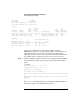
Go to BCH.
Configuration Menu: Enter command >
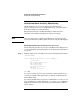
Listing nPartition Boot Settings [HP-UX]
This procedure (parstatus -V -p
#
and setboot commands) lists an
nPartition’s boot settings using HP-UX commands.
NOTE Use the parstatus command to list various nPartition boot settings for
any nPartition in a server complex.
The setboot command only provides information about the local
nPartition’s PRI and ALT boot paths and PRI boot actions.
Step 1. Login to HP-UX running on an nPartition.
If you want to list autoboot settings for an nPartition, you must login to
the nPartition. To list other details, such as boot paths and core cell
settings, you can login to any nPartition.
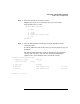
Step 2. Issue the parstatus -V -p
#
command to list detailed information about
the specified nPartition (-p
#
), including boot-related details.
The boot setting information that parstatus -V -p
#
reports is
equivalent to the following BCH commands: PATH, CELLCONFIG, and
CORECELL.
The following example lists detailed information for nPartition number
0, including the nPartition’s boot path settings, its core cell information,
and each cell’s use-on-next-boot settings.
# parstatus -V -p0
[Partition]
Partition Number : 0
Partition Name : jules00
Status : active
IP address : 0.0.0.0
Primary Boot Path : 0/0/2/0/0.13.0
Alternate Boot Path : 0/0/2/0/0.0.0
HA Alternate Boot Path : 0/0/2/0/0.14.0
PDC Revision : 6.0
IODCH Version : 23664