
Technical data





An Overview of nPartition Boot and Reset
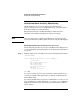
nPartition Boot Activity Monitoring
HP System Partitions Guide: Administration for nPartitions, rev 5.1
187
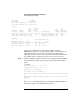
Step 2. Select the nPartition you wish to monitor.
Skip this step if you are accessing the service processor using a
single-partition-user account.
Partition VFP’s available:
# Name
--- ----
0) jules00
1) jules01
S) System (all chassis codes)
Q) Quit
GSP:VFP> 1
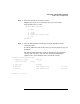
Step 3. View the VFP details for information about the nPartition and its
current boot state.
To exit the VFP and return to the service processor main menu, type ^b
(Control-b).
The VFP provides information about the nPartition state, nPartition
activity, each cell’s state, and each cell’s activity. The VFP display
updates as the cell or nPartition state and activities change.
E indicates error since last boot
Partition 1 state Activity
------------------ --------
Cell(s) Booting: 57 Logs
# Cell state Activity
- ---------- --------
4 Booting Cell firmware test 28 Logs
6 Booting Cell firmware test 28 Logs
GSP:VFP (^B to Quit) >