
Technical data





An Overview of nPartition Boot and Reset
Hanged HP-UX and Running HP-UX Detection
HP System Partitions Guide: Administration for nPartitions, rev 5.1
189
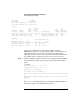
GSP> SL
Chassis Logs available:
(A)ctivity Log
(E)rror Log
(L)ive Chassis Logs
(C)lear All Chassis Logs
(Q)uit
GSP:VW> L
Entering Live Log display
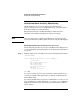
Step 3. From the Live Log display, type P and select the nPartition whose chassis
codes you want to view by typing the partition number.
By default the live chassis log viewer only displays alert codes.
When you select the partition filter, the live log’s view changes to show
all codes for the selected nPartition.
Entering Live Log display
A)lert filter
C)ell filter
P)artition filter
U)nfiltered
V)iew format selection
^B to Quit
Current filter: ALERTS only
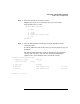
p
Enter partition number to display
Partitions available:
# Name
--- ----
0) feshd4a
2) feshd4b
Q) Quit
Please select partition number: 0
Filtering partition 0
Step 4. When viewing the selected nPartition’s live log display, determine
whether HP-UX is emitting HEARTBEAT chassis codes.