
Technical data





An Overview of nPartition Boot and Reset
Hanged HP-UX and Running HP-UX Detection
HP System Partitions Guide: Administration for nPartitions, rev 5.1
191
Step 6. Determine whether the nPartition needs to be reset in order to restore
HP-UX to a running state.
Review the findings from the previous steps in this procedure.
HP-UX on the nPartition may be considered “hanged” if you observed all
of the following VFP, live log, and console behaviors:
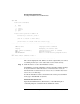
• The VFP indicates HPUX heartbeat in the partition state with no
asterisk (*) blinking to indicate activity.
• The nPartition’s live log displays no HEARTBEAT chassis codes.
• The nPartition console is inactive with no indication of a crash dump
or other error, and no console login or interactivity is possible.
If all of the above attempts to find signs of HP-UX activity on the
nPartition fail, then you may need to reset the nPartition before HP-UX
can be restored to a running state.
For details see the procedure Rebooting or Resetting an nPartition on
page 214 or the procedure Performing a Transfer-of-Control (TOC) Reset
of an nPartition on page 224.