
Technical data





Booting and Resetting nPartitions
Accessing an nPartition Console and BCH Interface
HP System Partitions Guide: Administration for nPartitions, rev 5.1
200
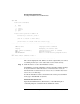
GSP> CO
Partitions available:
# Name
--- ----
0) jules00
1) jules01
Q) Quit
Please select partition number: 1
Connecting to Console: jules01
(Use ^B to return to main menu.)
[A few lines of context from the console log:]
- - - - - - - - - - - - - - - - - - - - - - - - - - - - - - -
SERvice menu Displays service commands
DIsplay Redisplay the current menu
HElp [<menu>|<command>] Display help for menu or command
REBOOT Restart Partition
RECONFIGRESET Reset to allow Reconfig Complex Profile
----
Main Menu: Enter command or menu >
- - - - - - - - - - - - - - - - - - - - - - - - - - - - - - -
The console displays the last 10 lines of console output when you connect
to it. This provides you a view of the most recent console activity.
Step 4. Gain interactive access to the nPartition console.
Press Enter to access the nPartition console’s currently available prompt,
if any. You will have either interactive or non-interactive access, as
described in the sections Interactive Console Access and Non-Interactive
Console Access in this step.
To exit the nPartition console and return to the service processor Main
menu, type ^b (Control-b) at any time.
Interactive Console Access
Typically the BCH interface, ISL interface, or the HP-UX login or
command prompt is available from the nPartition console.