
Technical data




Booting and Resetting nPartitions
HP-UX Booting on an nPartition
HP System Partitions Guide: Administration for nPartitions, rev 5.1
205
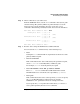
Step 2. Choose which device you wish to boot.
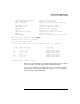
From the BCH Main menu, use the PATH command to list any boot path
variable settings. The primary (PRI) boot path normally is set to the
main boot device for the nPartition. You also can use the SEARCH
command to find and list potentially bootable devices for the nPartition.
Main Menu: Enter command or menu > PATH
Primary Boot Path: 0/0/2/0/0.13
0/0/2/0/0.d (hex)
HA Alternate Boot Path: 0/0/2/0/0.14
0/0/2/0/0.e (hex)
Alternate Boot Path: 0/0/2/0/0.0
0/0/2/0/0.0 (hex)
Main Menu: Enter command or menu >
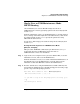
Step 3. Boot the device using the BCH interface’s BOOT command.
You can issue the BOOT command in any of the following ways:
• BOOT
Issuing the BOOT command with no arguments boots the device at the
primary (PRI) boot path.
• BOOT
bootvariable
This command boots the device indicated by the specified boot path,
where
bootvariable
is the PRI, HAA, or ALT boot path.
For example, BOOT PRI boots the primary boot path.
• BOOT LAN INSTALL or BOOT LAN.
ip-address
INSTALL
The BOOT... INSTALL commands boot HP-UX from the default
HP-UX install server or from the server specified by
ip-address
.
• BOOT
path
This command boots the device at the specified
path
. You can specify
the
path
in HP-UX hardware path notation (for example,
0/0/2/0/0.13) or in “path label” format (for example, P0 or P1) .
If you specify the
path
in “path label” format then
path
refers to a
device path reported by the last SEARCH command.