
Technical data




Booting and Resetting nPartitions
HP-UX Booting on an nPartition
HP System Partitions Guide: Administration for nPartitions, rev 5.1
206
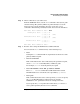
After you issue the BOOT command, the BCH interface prompts you to
specify whether you want to stop at the ISL prompt.
To boot the /stand/vmunix HP-UX kernel from the device without
stopping at the ISL prompt, enter n to automatically proceed past ISL
and execute the contents of the AUTO file on the selected device. (By
default the AUTO file is configured to load /stand/vmunix.)
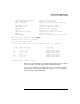
Main Menu: Enter command or menu > BOOT PRI
Primary Boot Path: 0/0/1/0/0.15
Do you wish to stop at the ISL prompt prior to booting? (y/n)
>> n
ISL booting hpux
Boot
: disk(0/0/1/0/0.15.0.0.0.0.0;0)/stand/vmunix
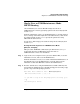
To boot an HP-UX kernel other than /stand/vmunix, or to boot HP-UX
in single-user or LVM-maintenance mode, stop at the ISL prompt and
specify the appropriate arguments to the hpux loader.