
Technical data




Booting and Resetting nPartitions
Single-User or LVM-Maintenance Mode HP-UX Booting
HP System Partitions Guide: Administration for nPartitions, rev 5.1
209
Single-User or LVM-Maintenance Mode
HP-UX Booting
On an nPartition you can boot HP-UX in single-user mode or
LVM-maintenance mode by specifying options to the Secondary System
Loader (hpux).
From the nPartition’s console, use the BCH interface to boot the desired
device and stop at the Initial System Loader (ISL) interface, then use the
Secondary System Loader (hpux) to specify the options for booting
HP-UX in the desired mode.
See the hpux (1M) manpage for details on using the Secondary System
Loader (hpux).
Booting HP-UX in Single-User or LVM-Maintenance Mode
[BCH, ISL, and hpux]
This procedure (BCH BOOT command, stop at ISL interface, use hpux
loader with options) boots HP-UX in single-user mode or
LVM-maintenance mode on an nPartition.
Step 1. Login to the server complex’s service processor (GSP or MP), access the
nPartition’s console, and access the BCH interface.
From the nPartition console you access the nPartition’s BCH interface. If
the nPartition is not at the BCH interface you must either boot the
nPartition or shut down HP-UX to return to the BCH interface.
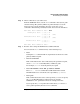
Step 2. Boot the desired device using the BCH interface’s BOOT command, and
specify that the nPartition stop at the ISL prompt prior to booting (reply
y to the “stop at the ISL prompt” question).
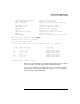
Main Menu: Enter command or menu > BOOT 0/0/2/0/0.13
BCH Directed Boot Path: 0/0/2/0/0.13
Do you wish to stop at the ISL prompt prior to booting? (y/n)
>> y
Initializing boot Device.
....