
Technical data




Booting and Resetting nPartitions
Single-User or LVM-Maintenance Mode HP-UX Booting
HP System Partitions Guide: Administration for nPartitions, rev 5.1
210
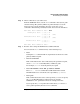
ISL Revision A.00.42 JUN 19, 1999
ISL>
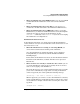
Step 3. From the ISL prompt, issue the appropriate Secondary System Loader
(hpux) command to boot the HP-UX kernel in the desired mode.
Use the hpux loader to specify the boot mode options and to specify which
kernel (such as: /stand/vmunix) to boot on the nPartition.
• To boot HP-UX in single-user mode:
ISL> hpux -is boot /stand/vmunix
• To boot HP-UX in LVM-maintenance mode:
ISL> hpux -lm boot /stand/vmunix
• To boot HP-UX at the default run level:
ISL> hpux boot /stand/vmunix
To exit the ISL prompt and return to the BCH interface, issue the EXIT
command instead of specifying one of the above hpux loader commands.
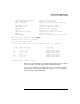
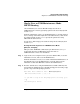
ISL Revision A.00.42 JUN 19, 1999
ISL> hpux -is /stand/vmunix
Boot
: disk(0/0/2/0/0.13.0.0.0.0.0;0)/stand/vmunix
8241152 + 1736704 + 1402336 start 0x21a0e8
....
INIT: Overriding default level with level ’s’
INIT: SINGLE USER MODE
INIT: Running /sbin/sh
#
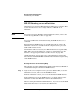
See the hpux (1M) manpage for a detailed list of hpux loader options.