
Technical data



Booting and Resetting nPartitions
Configuring Boot Paths and Boot Actions
HP System Partitions Guide: Administration for nPartitions, rev 5.1
231
4/0/2/0/0.a (hex)
Main Menu: Enter command or menu >
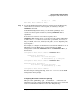
Step 4. Access the BCH Configuration menu by entering CO at the Main menu,
and set the boot action for each boot path, as desired, by using the
PATHFLAGS command.
At the BCH Configuration menu, you can list the path flags (boot
actions) for all boot path variables by entering PATHFLAGS with no
arguments.
To set the boot action for each of the boot paths, enter
PATHFLAGS
VAR action
, where
VAR
is the boot path variable (PRI, HAA,
or ALT) and
action
is the boot action (0 for “go to BCH”, 1 for “boot, if
fail go to BCH”, 2 for “boot, if fail try next path”, or 3 for “skip this path,
try next path”).
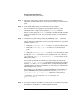
For example, to configure an nPartition to boot from the PRI device or (if
PRI fails to boot) the HAA device, use the following two BCH
Configuration commands: PATHFLAGS PRI 2 and PATHFLAGS HAA 1, as
shown below.
Configuration Menu: Enter command > PATHFLAGS PRI 2
Primary Boot Path Action
Boot Actions: Boot from this path.
If unsuccessful, go to next path.
Configuration Menu: Enter command > PATHFLAGS HAA 1
HA Alternate Boot Path Action
Boot Actions: Boot from this path.
If unsuccessful, go to BCH.
Configuration Menu: Enter command >
For other help in setting path flags, enter HELP PATHFLAGS at the BCH
Configuration menu prompt.
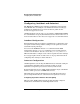
Configuring Boot Paths and Actions [HP-UX]
This procedure (parmodify -p
#
... and setboot... commands) sets
nPartition boot path variables from HP-UX and enables you to check and
set the local nPartition’s PRI boot action (the PRI path flag).